How does an online stopwatch work?
An online stopwatch is a free timer in your browser that counts up from zero when you press Start, records each lap you mark, and stops when you tell it to, with nothing to install and no account.
On this page
- How to use the online stopwatch
- Which keyboard shortcuts control the stopwatch?
- How does the online stopwatch keep accurate time?
- What is the difference between lap time and total time?
- How do you export stopwatch laps to a spreadsheet?
- Does the stopwatch keep running after a reload or a closed tab?
- Is a stopwatch the same as a timer?
- What can you time with an online stopwatch?
- When should you use a time tracker instead of a stopwatch?
Under the hood, the page notes the exact moment you began and reads the device clock again every time it redraws the digits. That is why the tool can measure a 40-second sprint or a three-hour session with the same logic, and why closing the tab does not wipe the run.
The part most people skip is the Lap button. If you record laps during workouts or while studying, the stopwatch stops being a single number and becomes a small data set you can read, compare and save as a CSV file.
In my own use, the habit that changed the most was pressing Lap at every natural break instead of resetting. A plain timer tells you when to stop; a stopwatch with laps tells you where the time actually went.
How to use the online stopwatch
The online stopwatch needs one click to start, one press of Lap per split, and one press of Stop when you are done. The controls are the same on a laptop or a touchscreen, and the keyboard covers every button.
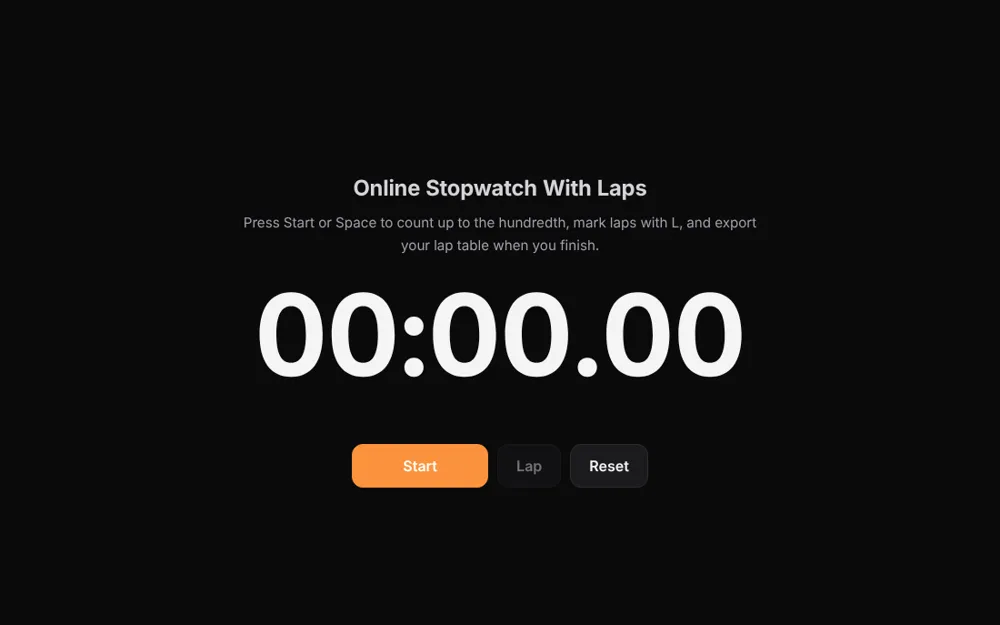
- Start: Press the Start button or Space. The display runs as minutes:seconds.hundredths and adds hours after 60 minutes.
- Lap: Press Lap (or L) at the end of each round. The current lap time shows under the main readout.
- Stop and read: Press Stop. The lap table lists lap number, lap time and total time, with the fastest lap highlighted green and the slowest red once you have two or more.
- Save: Use Copy times or Download CSV, then Reset.
Worked example: a runner does three laps of a track and presses Lap after each. Lap 1 = 1:52.40, lap 2 = 1:49.85, lap 3 = 1:55.10. The table shows a running total of 1:52.40, 3:42.25 and 5:37.35, marks lap 2 green and lap 3 red, and the split time gap between the best and worst lap is 5.25 seconds.

Which keyboard shortcuts control the stopwatch?
The stopwatch uses four keyboard shortcuts: Space to start or stop, L for a lap, R to reset and F for full screen. Keeping your hands on the keys matters most when the screen is across the room, for example in classes, at presentations or on stages where you run the clock from a laptop.
| Key | Action | When it works |
|---|---|---|
| Space | Start, Stop or Resume | Any time |
| L | Add a lap | While running |
| R | Reset to zero | Clears laps and time |
| F | Full screen on or off | Any time |
Stop freezes the display on the exact hundredth you pressed it, so you can read the result before deciding to resume or reset. I keep R away from my resting fingers for one reason: a reset clears the run, and there is no undo.
How does the online stopwatch keep accurate time?
The online stopwatch keeps accurate time by calculating elapsed time as "now minus the start moment" on the device clock, instead of adding up small increments. A counter that ticks forward each frame can lose time; a subtraction cannot, because the start moment never changes.
That design matters in a browser-based tool. When you switch tabs, start minimizing windows or end up locking the screen, browsers slow down background work, so a frame counter would fall behind. The subtraction gives the right answer the instant the page draws again, even after the laptop wakes from sleeping.
Browser stopwatches that read the device clock this way are generally described as accurate to within a few milliseconds for everyday timing. They are not certified timing equipment, and a stopwatch does not have a set duration to fall back on, so a browser restart only works because the start moment is saved, not because the clock kept ticking somewhere.
What is the difference between lap time and total time?
Lap time is the length of one segment, while total time is everything since Start, so a lap table needs both to show pacing. For athletes and coaches, the lap column answers "how fast was this one?" and the total column answers "where am I in the session?"
The difference shows up quickly in swimming laps or running on a track. A swimmer whose total looks fine may be fading: laps of 0:41, 0:42, 0:45 add up to a normal 2:08, but the third lap tells the real story about pacing.
Gamers timing a speedrun use the same idea with segments instead of laps, and the precision of hundredths is plenty there. Milliseconds only become the deciding figure in races or hard intervals where two efforts are nearly identical, and even then a human thumb on the button adds its own reaction delay.
How do you export stopwatch laps to a spreadsheet?
You export stopwatch laps by pressing Download CSV, which saves the lap table as a file that spreadsheet apps open directly, or by pressing Copy times to paste them. That one step turns a session's measurements into something you can review next week.
Once the laps sit in columns, the useful math is easy: the difference from the previous lap, the average lap, or the spread between best and worst. A single number on the screen tells you how long; a column of numbers tells you whether you are getting faster.
I export before pressing Reset, because Reset clears all data from the current run. Science lab groups do the same with repeated observations, such as timing a pendulum ten times and averaging the trials in the sheet afterwards.
Does the stopwatch keep running after a reload or a closed tab?
Yes, the stopwatch keeps running after a reload or a closed tab, because it saves its start moment and laps in your browser and rebuilds the display when you return. No separate device or app is involved; the page simply recalculates from the saved moment.
Background tabs are throttled by browsers to save power and reduce system load, yet that does not cause drift here, since the time comes from the device clock subtraction rather than from counting frames. The elapsed time also shows in the tab title, so you can check it without leaving the page you are on, and exit full screen without stopping anything.
The weak spot is storage, not timing. Clearing site data can mean the run is lost, which is why this tool is a measuring aid and not a time tracker with timesheets or invoicing for billable work.
Is a stopwatch the same as a timer?
A stopwatch is not the same as a timer: a stopwatch is counting up from zero to tell you how long something took, while a timer counts down from a length you choose and rings at the end. Picking the wrong one is the most common mix-up I see. If you need the countdown side, the online timer and the countdown timer both ring at zero.
Cooks juggling several dishes often want both. A countdown handles the pasta, but a stopwatch is better for "how long has the sauce been reducing?", because you do not know the end time in advance.
The same context decides it for exam sections: practicing against a fixed limit calls for a timer, while finding out how long you naturally take calls for a stopwatch. If you want focused work blocks with breaks, the pomodoro timer handles the cycle for you. Both are free here, with no sign-up, and each needs only a press or two and no setup steps.
What can you time with an online stopwatch?
An online stopwatch can time anything with a start and an end that you do not know in advance, and laps let you compare the parts side by side. The table below shows what one lap usually marks for different people.
| Activity | One lap marks | What to compare |
|---|---|---|
| Running or cycling | One loop or rep | Fastest lap vs. slowest |
| Students practicing tests | One question block | Blocks that ran long |
| Gamers | One level or split | Segment against last attempt |
| Freelance tasks | One task | Work hours per project or client |
Strength training works too: press Lap after each rep set to see your rest creep up. Once the laps are in a spreadsheet, patterns that felt like guesses become obvious. A week of study blocks, for instance, quickly shows which subject always overruns.
When should you use a time tracker instead of a stopwatch?
Use a time tracker instead of a stopwatch when the time has to be billed, reported or kept for months, because a stopwatch only measures and stores the run locally in your browser. Nothing is sent to servers, which is good for privacy but means no account history.
That local state survives a reload and stays intact after closing the tab, but browser storage can be wiped by clearing site data or using a private window. For everyday use, such as meetings you want to keep short or a quick workout, that is perfectly fine.
My rule of thumb: if someone else will ever ask "how many hours did that take?", export the CSV the same day, or log the session in a proper tracking system.
Need a different tool? Browse all timers & stopwatch.
Frequently asked questions
Does the online stopwatch cost anything?
No, the online stopwatch costs nothing to use, with no install, no sign-in and no paid tier. One click starts it, the keys and full-screen toggles work right away, and there is no billing page anywhere.
Laps go to the clipboard with Copy times, and you can paste them into Excel, Google Sheets or Numbers, or download them as CSV. The pasted layout may arrive tab-separated or as plain lines depending on the app you paste into.
Is an online stopwatch accurate enough for official race timing?
No, an online stopwatch is not accurate enough for official race timing, because it is not certified equipment and it depends on a human pressing a button. It is accurate for practice: it reads absolute time from the device clock instead of counting tick by tick, so background tabs and screen refresh speed do not change the result.
The display shows hundredths and the running time appears in the tab title. Unlike a timer that counts down and alerts you, a stopwatch simply has no limits to reach.
Is there a limit on laps or on how long the stopwatch runs?
The stopwatch has no fixed end point that you set: it keeps counting and adds hours to the display after 60 minutes, so long runs stay readable.
The practical limit on a long run is your browser storage, not the clock, so export laps before clearing site data. Very long lap tables are simply harder to read, so export them in chunks if you mark hundreds of laps.